It wasn’t that long ago that Android tablets were treated as second-class citizens. Those days are gone as Android tablets have gone from an afterthought for many companies to a primary focus.
With this renewed interest, there has been an explosion in the category, offering a variety of options that cover almost anything you could need from a tablet.
Whether you need a performance monster capable of taking on anything you can throw at it, a tablet for taking notes, or a small tabletyou can toss in your bag, there is an Android tablet designed for you.
Android devices have always been about versatility and openness, and it’s awesome to see that same philosophy come to tablets.
However, with so many options available, finding a great one can be daunting. This list is your cheat sheet for finding the best Android tablets that are worth your hard-earned pennies.
Top Android tablets around

7.5/10
- Storage
-
256GB
- Operating System
-
OxygenOS 15
- Battery
-
12,140mAh
The OnePlus Pad 3 features an expansive 13.2-inch LCD panel with a 3.4K resolution and 120Hz refresh rate. It’s powered by a Snapdragon 8 Elite with 12GB of RAM, providing ample horsepower for even the most intensive Android apps. OnePlus included a massive 12,140mAh battery, which the company claims can hold a charge for 70 days on standby.
- Fantastic performance
- Excellent battery life
- Large display
OnePlus delivered our top pick for another consecutive year with the excellent OnePlus Pad 3. It’s a fantastic blend of power and performance, precisely what we expect from OnePlus.
It features an expansive 13.2-inch display, ideal for productivity work. Yes, it’s an LCD, but the price trade-off is worth it, especially given its other specs.

The OnePlus Pad 3 is powered by a Snapdragon 8 Elite paired with 12GB of RAM. It’s all the performance you need in a tablet and then some.
The OnePlus Pad 3 effortlessly handles even the most intensive Android apps, and gaming is a silky-smooth experience.
I’ve been impressed by every device I’ve used that has a Snapdragon 8 Elite, and the OnePlus Pad 3 is no exception.
It’s not just the snappy performance that makes the OnePlus Pad 3 stand out. The tablet gets outstanding battery life, thanks in part to its 12,140mAh battery. Standby time can be counted in months, and you’ll notice little battery drain when it’s not in use for a day or two.
When it is time to charge up, the OnePlus Pad 3 features the fast 80W wired charging that the company is known for.

OxygenOS 15 is a pleasant experience on the OnePlus Pad 3, and Open Canvas remains the standard for multitasking on Android.
OnePlus promises three years of OS upgrades and six years of security updates. I would have liked a few more years of OS upgrades, but the security patches ease any disappointment.
The best part about the OnePlus Pad 3 is the price. All that power and a premium build cost only $700, a significant discount compared to the flagship Samsung tablets.
Yes, it has some limitations, but a friendly price tag goes a long way in making me overlook them.
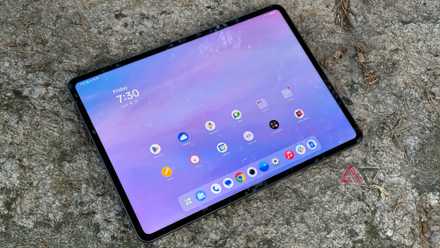
The OnePlus Pad 3 almost made me a believer
I still have more questions

6.5/10
- SoC
-
MediaTek Dimensity 9400+ (MT6991)
- Display type
-
Dynamic AMOLED 2X
- Display dimensions
-
14.6-inch
The Samsung Galaxy Tab S11 Ultra offers massive improvements over its predecessor. It features a 14.6-inch AMOLED display, the S Pen in the box, and a powerful chipset. It also has AI features that help you be more creative and get work done faster and more efficiently.
- Large and beautiful display
- Snappy performance
- Great battery life
- It could do with a newer design
- A bit expensive
When shopping for a premium tablet that will feel extra good in the right hands, you can’t go wrong with the Samsung Galaxy Tab S11 Ultra.
The entire tablet feels premium down to its core, with an exceptionally large 14.6-inch AMOLED display, a decently powerful MediaTek Dimensity 9400+ processor, and 12GB or 16GB of RAM to boot.

Everything combined is what makes the Galaxy Tab S11 Ultra no slouch in performance. Plus, the large screen also makes the tablet feel incredibly close to a desktop experience with Samsung DeX.
The battery life is pretty solid. The Galaxy Tab S11 Ultra has an 11,600mAh battery, much larger than its less-premium sibling, the Galaxy Tab S11 (which has an 8,400mAh battery).
Though it has a hefty battery capacity, you might be worried about charging it reliably — you don’t need to. The Galaxy Tab S11 Ultra supports 45W wired fast charging, so it should take you less than two hours to get the device going again.

The Galaxy Tab S11 Ultra is totally ridiculous, but that hasn’t stopped me liking it
Big hands and a deep wallet needed
Currently, the Galaxy Tab S11 Ultra offers the best overall experience, and more. However, it’s more a matter of whether this is absolutely necessary. While this tablet proves to be a complete beast, it might end up being a bit of overkill for your needs.
But if you’re on a budget and don’t need the overly large screen or the extra specs, you’ll want to look at other options, like the base Galaxy Tab S11, for a more comparable experience.

8.5/10
- SoC
-
Octa-core
- Display type
-
LCD
- Display dimensions
-
10.1″
The new Fire HD 10 improves upon performance and benefits from durable construction materials to deliver a fantastic tablet experience that is both affordable and enjoyable. It’s a great tablet for kids or the budget-minded.
- Bright display
- Better performance than previous generations
- Extended software support
- No Google Play Store unless sideloaded
- Relatively slow charging
It’s difficult to talk about budget tablets without mentioning the Amazon Fire HD 10. The latest-generation Fire HD 10 is a noticeable step up from its predecessors, offering snappier performance and more productivity features.
I always thought of the Amazon Fire HD 10 as a content-consumption device — a nice, large screen for binge-watching my favorite shows. That’s still true, but this latest Fire HD 10 is excellent for the office and classroom.

Paired with a Bluetooth keyboard and stylus, the Amazon Fire HD 10 becomes an ideal companion for less than $200. Amazon also supports them for years, and you get access to Amazon’s ecosystem of apps and content.
The Fire HD 10 sports an expansive 10.1-inch 1080p display. It gets bright enough to do the job, and its excellent battery life means it won’t run out of power in the middle of marathoning your favorite show.

Then there’s the price, which is almost unbeatable for the amount of utility you get. With frequent sales, you can purchase the Amazon Fire HD 10 for under $100, and I believe it’s worth it, even at the full $140 price tag.
If you’re on a budget but want a tablet that’s well-supported and can handle a bit of everything, the Amazon Fire HD 10 is an ideal choice.
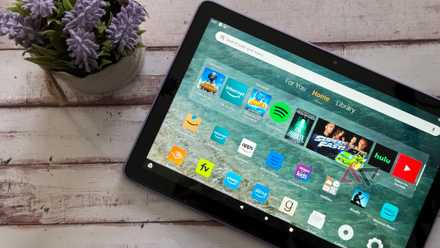
Amazon Fire HD 10 (2023): Still the best for the budget-minded
It’s still the best value in tablets, but Android manufacturers are catching up

- SoC
-
Mediatek Helio G100
- Display type
-
LCD
- RAM
-
8GB
- Storage
-
256GB
The TCL NXTPaper 11 Plus is an e-ink-like experience but with modern tablet specs. It has a delectable 120Hz refresh rate and an IPS panel with a Matte Anti-Glare coating, which makes this slate easy on the eyes for casual reading — while remaining completely accessible and affordable.
- Anti-glare is good for reading
- Decent performance
- Above-average battery life
- Heavy tablet for holding
- Not a true e-ink option
It’s more accurate to describe it as a hybrid between E Ink and a tablet. The TCL NXTPaper 11 Plus is still a traditional tablet that mimics the look of paper.
But it specializes in anti-glare and blue-light-reduction technology, which is powered by TCL’s Nxtpaper 4.0.
So this would be a great choice for those with sensitive eyes and who are conscious of reducing eye strain. The tablet features a MediaTek Helio G100 processor coupled with 12GB of RAM and an option to add another 8GB of RAM as an expansion.
The TCL NXTPaper 11 Plus has an 8,000mAh battery and 33W fast charging. The battery size is fair, and the fast charging is decent, not overly fast, but good enough for the size.
More importantly, for a sub-$300 tablet, you’re getting a pretty good display: 11.5-inch, 120Hz refresh rate, and 2.2K resolution. But it is the processor that is holding it back from being the perfect experience.
The screen on the TLC NXTPaper 11 Plus is comfortable enough for reading, but it’s a bit heavy to hold (it’s 490g). The colors are vibrant, and it’s not too eye-straining.
The default model is 256GB and comes packaged with a stylus and a flip case.

- Storage
-
32 or 64GB
- Operating System
-
Fire OS 8.3
- Ports
-
USB-C 2.0, MicroSD
- Display type
-
LCD
- Price
-
$100
In line with previous Amazon Fire tablets, the latest iteration of the Fire HD 8 doesn’t boast blazing performance, but works well for simple tasks. It delivers a considerably smoother, more satisfying experience than similarly priced tablets, and sideloading the Google Play Store unlocks impressive versatility.
- As affordable as a functional tablet can be
- Better performance than other cheap models
- Battery lasts quite a while
- Needs the Play Store sideloaded for best results
- Takes a long time to charge
Amazon’s Fire Tablet lineup occupies an important niche within the Android tablet market. They’re routinely the most affordable, and their “bends but won’t break” build quality makes them great for casual use, especially by kids.
The 2024 refresh of the 8-inch entry makes a few upgrades over its predecessor. However, it doesn’t need to because Amazon’s relatively locked-down, Android-based Fire OS uses system resources frugally.

That efficient Fire OS interface works fine, and although it’s the absolute most user-friendly, it gets the job done.
The Fire HD 8’s biggest drawback is that it’s not ideal for running some apps, and doesn’t offer Google Play Store access by default (Amazon continues to operate its Appstore on Fire tablets).
Assuming you’re okay with less-than-speedy performance at times, it’s a great option, but it does have some downsides that software tricks can’t fix.
Most notably, the charging speed stinks, so stay vigilant, as you don’t want the battery to run out when a fussy kid (or adult, for that matter) needs a little distraction.

Amazon’s Fire HD 8 still sets the bar for budget tablets
More RAM makes the difference
Android Police expert Stephen Radochia notes that it’s a worthwhile purchase even at full price, but watchful eyes can help you spot relatively common discounts. It’s not unusual to find it for as low as $60, and at that price, it’s hard to pass up if you need something simple but effective.

7/10
- SoC
-
MediaTek Dimensity 7300 Ultra
- Display type
-
LCD
The OnePlus Pad Go 2 packs a punch with its expansive 12.1-inch display and modest-performing chipset. Designed for mobility, it offers 5G connectivity alongside a massive 10,050mAh battery to keep you powered through the day. For those looking to get creative or stay productive, it also supports the OnePlus Pad Go 2 Stylo.
- Affordable
- Open Canvas split screen mode is great for multitasking
- 5G connectivity
- No microSD slot for storage expansion
- Uses an IPS LCD panel
Maybe the premium OnePlus Pad 3 is a bit out of your price range; if so, you might be more interested in the OnePlus Pad Go 2 as a more budget-friendly alternative.
Powering the OnePlus Pad Go 2 is the MediaTek Dimensity 7300 Ultra; you’ll find this processor in the Poco X7 and the Motorola Razr 2024.
It also comes with 8GB of RAM and 128GB of storage; this is a little small for a tablet in 2026, and sadly, there is no option to add a MicroSD card.
This tablet features a generous screen. The 12.1-inch 2.8K 120Hz LCD display with 900-nit brightness and quad speakers makes it an excellent choice for media consumption — ideally for videos and reading.
Though our reviewer notes that 900 nits of brightness is acceptable. However, our testing shows that, for some reason, this tablet has a wonky ambient light sensor with poor calibration. That means it’s likely you won’t reach 900 nits straight away while using it.

The OnePlus Pad Go 2 is the bargain Android tablet you want
All the tablet you need?
As for battery life, it’s fine, but nothing too crazy. That’s mainly due to the Dimensity 7300 Ultra processor, which isn’t that efficient for this tablet.
Our reviewer also notes that you should expect around five hours of screen time on a single charge, which isn’t amazing but still doable — though anything below that would be abysmal.
Also, since the OnePlus Pad Go 2 has a 10,500mAh battery, it comes with a 33W USB-C charger. This makes it somewhat slower to fully regain its charge.
Software is where it hurts the most, given that its competition is the Samsung Galaxy Tab S10 FE, which is miles ahead in software support.

OnePlus will only provide three major OS updates — which isn’t great — while the Galaxy Tab S10 FE will receive seven.
Unfortunately, this is part of the price you pay for OnePlus’s software — it’s still not great, while competitors are getting better.
At the very least, the software that comes preloaded on the tablet, OxygenOS 16, is fairly good. It’s notably clean and intuitive to use, so it’s not like the experience is all that bad, just short-lived.
Plus, the “Open Canvas” feature is built with multitasking in mind. It lets you run and display up to three apps simultaneously in resizable or floating windows.
Overall, it’s a solid tablet at an okay price point — plus, if you buy one from the OnePlus online store, you can potentially get a free Folio case and stylo to go with it.

- SoC
-
Exynos 1580
- Display type
-
LCD, 90Hz
- Display dimensions
-
10.9″
- RAM
-
8GB/12GB
- Storage
-
128GB/256GB
Samsung’s latest midrange tablet isn’t just a spec bump. With a brighter display, new AI tools, and IP68 water and dust resistance, the Tab S10 FE could be one of the best value tablets around at just $500.
- Capable chipset
- Included stylus
- IP68 rating
If you need a stylus for your tablet and are looking for a solid all-around choice, the Samsung Galaxy S10 FE is worth considering again this year.
It has a few compromises you’d expect from a midrange tablet, such as a 10.9-inch LCD instead of the OLED featured on more expensive Samsung tablets. I don’t mind that, and I think the benefits outweigh the additional value of the OLED.
The Galaxy S10 FE is powered by an Exynos 1580. I’ve had excellent luck with this chipset in a couple of devices I’ve used it on. The Exynos 1580 offers smooth performance and is also a power-efficient chipset. It can be paired with either 8GB or 12GB of RAM, depending on what you plan to do with your tablet.
It’s running Android 15 out of the box, with some Galaxy AI features sprinkled on top. The tablet is also IP68-rated for added peace of mind. There is a stylus, ideal for drawing and navigation for those who love tactile input.
If you want a solid tablet that’ll perform well while providing the conveniences of a stylus, the Galaxy S10 FE should be on your list.

8.5/10
- SoC
-
MediaTek Dimensity 8300
- Display type
-
144Hz LCD
- Display dimensions
-
12.7″
The Lenovo Idea Tab Pro is one of the best value-to-performance tablets you can get in 2026. Out of the box, the tablet already offers a top-notch display experience, thanks to the generous specs Lenovo launched with it: the Idea Tab Pro has a 144Hz refresh rate and a 12.7-inch 3K display. Plus, the MediaTek Dimensity 8300 is a solid contender for balancing performance with a bit of fun and productivity, making light gaming and multitasking an absolute breeze without breaking the bank.
- Great battery
- Spacious screen that gives it a PC-like experience
- Good performance
- Terrible software support
- Slightly more expensive
The Lenovo Idea Tab Pro (Gen 1) came out in March 2025. So it’s not completely new, but it isn’t that old, either. One concern is that it was slightly more expensive than you’d expect for a mid-range option.
The $400 price point isn’t easy to swallow, especially when Lenovo is only willing to offer this tablet two years of software support, plus four years of security patches.
Those wanting the top-of-the-line, newest Lenovo Idea Tab Pro will want to wait for the Gen 2, which is releasing in July 2026.
While not being up to date on the latest software might not be a dealbreaker for some, it still puts a bit of a damper on the pricey buy.
Well, outside of that, the Idea Tab Pro is still a really good tablet — and getting it at a discount is the sure way to go.

Lenovo’s 2025 tablet is powered by a Dimensity 8300, which isn’t obscenely powerful but is still fairly good, especially if you only use the tablet casually for apps, some AI features, and a bit of streaming.
While you can technically game on it, the chip isn’t quite powerful enough to play anything at high settings.
The built-in PC mode is really good for productivity. It’s similar to Samsung’s DeX experience, which allows you to turn your tablet into a mini computer that pairs well with a keyboard. Students would ideally want to make good use of this.
In terms of its design, the tablet is big and heavy. So it’s not exactly a tablet you want to hold for long periods.
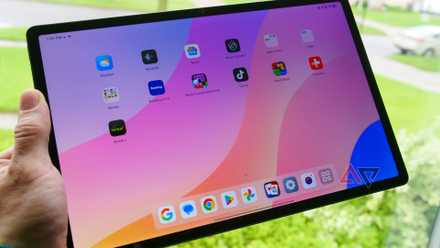
Lenovo’s Idea Tab Pro is a near-perfect budget tablet
Big screen, loud speakers, can’t lose
But the 12.7-inch display is still pretty generous in terms of quality. This slate has an LCD panel, but it’s ultra-sharp at 273 PPI and ultra-fast at 144Hz.
Though it does get a little rough when you’re trying to view the screen at an angle.
The Idea Tab Pro also features a large 10,200 mAh battery and 45W fast charging. Additionally, Lenovo includes a compatible charger in the box when you buy it.
Good battery life is a must, especially when a tablet is marketed as a budget option yet still a bit costly — thankfully, Lenovo didn’t disappoint us too hard in that area.
The best Android tablet for you
Picking an Android tablet isn’t as easy as it used to be, but in a good way. Where once just a few good options made any sense, a variety of choices at a wide range of prices now give tablet fans a lot of flexibility.
From great budget models to tablets that include every feature you could think of, it’s a great time to be an Android fan.
The OnePlus Pad 3 does everything you could ask from a flagship tablet. It features excellent performance and the value OnePlus is known for. If you need the raw performance of the Snapdragon 8 Elite with 12GB of RAM, the OnePlus Pad 3 is a steal for only $700.
Samsung makes a variety of tablets to suit every budget, but if you need to go cheap, the old Fire tablets still work fine, though the streamlined software experience is still a bit questionable.
If you need something more practical beyond basic reading, the OnePlus Pad Go 2 is a solid contender that doesn’t break the bank and offers a long-lasting screen with good multitasking capabilities.
However, if budget isn’t an issue, you’ll love what the Galaxy S11 Ultra offers, thanks to its generous RAM and powerful chipset. It’s one of the best Samsung tablets for a reason, so you basically get what you pay for.
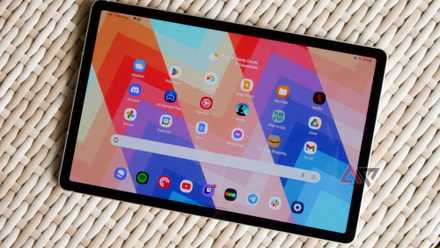
The iPad’s limitations are making Android tablets more compelling
Let’s settle this for once: the iPad isn’t the default tablet anymore
PakarPBN
A Private Blog Network (PBN) is a collection of websites that are controlled by a single individual or organization and used primarily to build backlinks to a “money site” in order to influence its ranking in search engines such as Google. The core idea behind a PBN is based on the importance of backlinks in Google’s ranking algorithm. Since Google views backlinks as signals of authority and trust, some website owners attempt to artificially create these signals through a controlled network of sites.
In a typical PBN setup, the owner acquires expired or aged domains that already have existing authority, backlinks, and history. These domains are rebuilt with new content and hosted separately, often using different IP addresses, hosting providers, themes, and ownership details to make them appear unrelated. Within the content published on these sites, links are strategically placed that point to the main website the owner wants to rank higher. By doing this, the owner attempts to pass link equity (also known as “link juice”) from the PBN sites to the target website.
The purpose of a PBN is to give the impression that the target website is naturally earning links from multiple independent sources. If done effectively, this can temporarily improve keyword rankings, increase organic visibility, and drive more traffic from search results.